-
E-mail
jtkhyq@126.com
-
Phone
13814782169
-
Address
No. 98 Jinsheng East Road, Jintan Economic Development Zone
Product Categories
Jintan District Antou Kehui Instrument Factory
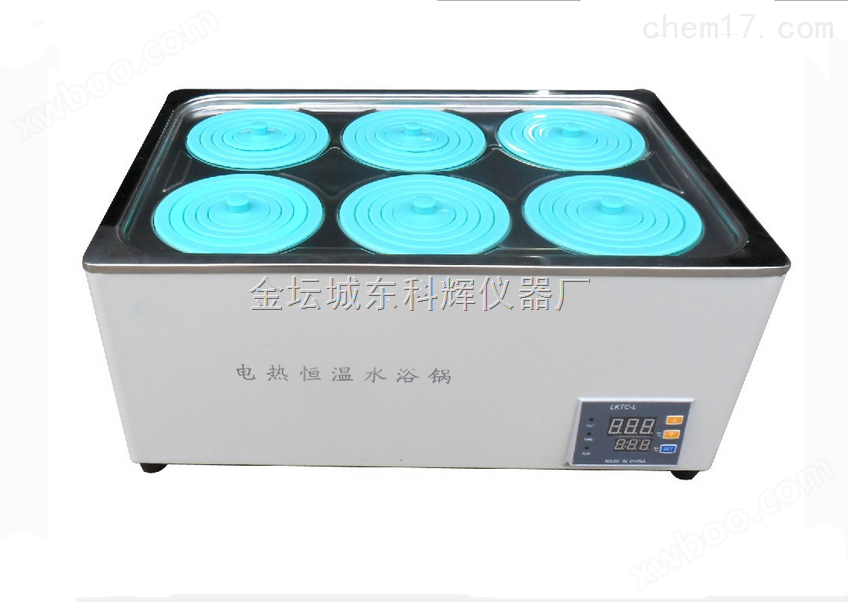
SHJ-6AB Six hole six temperature magnetic stirring water bath
NegotiableUpdate on 01/22
- Model
- Nature of the Manufacturer
- Producers
- Product Category
- Place of Origin
Overview
SHJ-6AB Product features of the six hole six temperature magnetic stirring water bath: The temperature of the six pot is individually controlled without interference, with stepless speed regulation. It adopts an integrated voltage regulator circuit, with a stable speed that is not affected by voltage or fluctuations. It has LED display, microcomputer temperature control, and a special forming process for the heater. The immersion U-shaped heating ensures even heating. (If it is an oil bath, an additional temperature control instrument can be selected.)
Product Details
SHJ-6AB six hole six temperature magnetic stirring water bathProduct features:
The temperature of the six pot is individually controlled without interference, with stepless speed regulation. It adopts an integrated voltage regulator circuit, which ensures stable speed and is not affected by voltage or fluctuations. The LED display and microcomputer temperature control are used. The heater adopts a special molding process, with immersion U-shaped heating for uniform heating. (If it is an oil bath, an additional temperature control instrument can be selected.)
SHJ-6AB six hole six temperature magnetic stirring water bathThe specific parameters are as follows:
1. Speed: 0-2400 revolutions per minute (speed error ± 2 revolutions per minute, constant speedometer)
Motor power: 25W * 6
3 timing range; 0-120min
4 Temperature Range RT-100 ° C
5 Accuracy: ± 0.2 ° C
6 working dimensions: 200 * 100 * 6
Note: This product can also be customized in different sizes according to customer requirements. If you need to display the speed separately, that is, the speed digital display, the price will be discussed separately
SHJ-6AB six hole six temperature magnetic stirring water bathInstructions for Use:
1. Place the flask containing the stirring element of the solution in the pot or directly place the stirring element in the container
2. Connect the power supply, turn on the power switch, turn on the timer, turn on the mixing switch, and turn the speed control knob to the desired speed
Set the temperature, press the SET key to set the temperature, press the SET key to flash the data on the digital display in the lower row (normal measurement in the upper row), indicating that the instrument has entered the temperature setting state. Press the △ key to increase the set value, press the ▽ key to decrease the set value, and continue to press the increase or decrease key to accelerate the change of the set value. Press the SET key again to return the instrument to normal working state, and the temperature setting is complete
Correction of sensor error: When confirming that the displayed value of the instrument is not the correct measurement value, the displayed value can be corrected. Press the SET button for three seconds to enter the inner menu of the instrument. After selecting the parameter SC, use the △ and ▽ buttons to modify this parameter. The correction range of sensor error is+50 to -50. After correction is completed, press the SET button for three seconds to exit. When the instrument is shipped from the factory, the correction value is 0. During use, it is necessary to prevent correcting the instrument that displays correctly to an incorrect value
Starting self-tuning, this product can adapt to the vast majority of control systems. Only when the control effect is particularly unsatisfactory, the direction will start self-tuning. Press the SET key for three seconds to enter the inner menu of the instrument. After selecting the parameter AT, use the △ key ▽ key to start self-tuning. At this time, the AT indicator light starts flashing, and the instrument enters the automatic tuning parameter working state. The instrument controls the heating system and fluctuates for the second time near the set point. When the AT light goes out, the self-tuning is completed, and the new PID parameters are locked in the chip,
Adjust the speed control knob to the desired speed
After completing the work, place the speed control knob in the * * * small position, the temperature control switch in the * * * small state, turn off the power switch, and cut off the power supply
5. Clean the working surface thoroughly
Similar Product Recommend