-
E-mail
gzfuqi@163.com
-
Phone
13632316710
-
Address
No. 19 Anping North Road, Zhongluotan Town, Baiyun District
Guangzhou Fuqi Food Machinery Co., Ltd
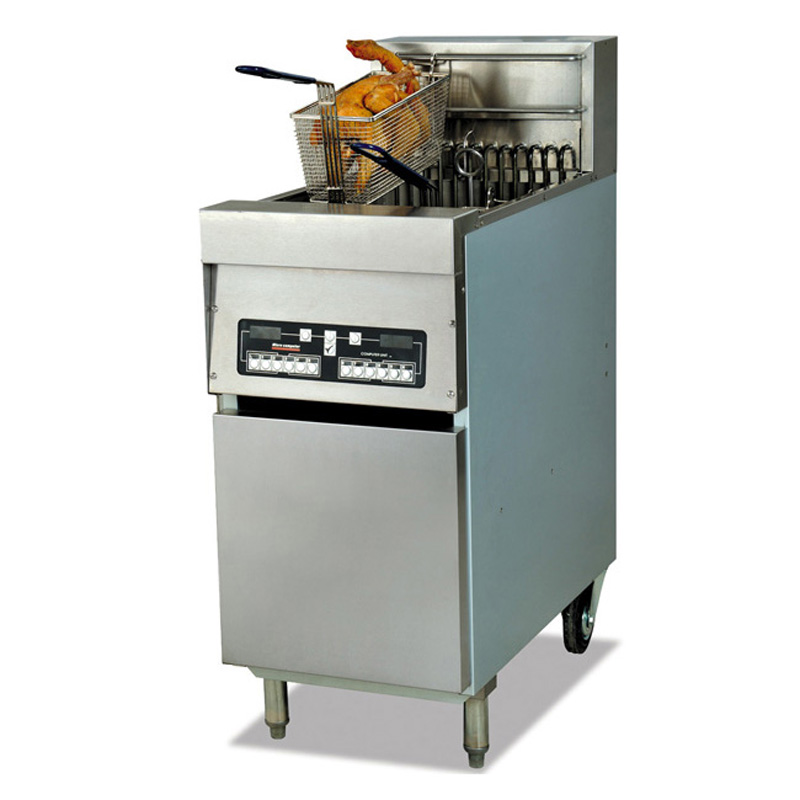
Instructions for using the high-end computer version of the Fuqi brand electric blast stove
Date: 2022-02-13Read: 40
1. Total time parameter setting
When the TIMER key is pressed, the number in window 1 flashes. Adjust the time value (adjustable range of 99 minutes and 59 seconds) using the "INCREASE" and "DECREASE" keys. Note that the adjustment of the minute and second time for a single cylinder six stage furnace must be switched by pressing the 1 key. Adjust different times as needed, and then press the TIMER key to confirm; At the same time, the number of window 2 flashes, and by repeating the previous step, the time value of window 2 can be set... After confirming the setting of window 6, the working time is set; We can also confirm and end the working time setting by pressing the "REMINDER" key during the process of setting the working time values for windows 1-6. (When the countdown to working hours is completed, the time window flashes to display END and beeps to prompt)
2. Setting of Shake Basket Time
Press and hold the REMINDER key for 3 seconds, and the number in window 1 will flash. Use the "INCREASE" and "DECREASE" keys to adjust the time value (adjustable range of 99 minutes and 59 seconds). Note that for adjusting the minute and second time of a single cylinder six stage furnace explosion, press the 1 key to switch. Adjust different times as needed, and then press the REMINDER key to confirm; At the same time, the number in window 2 flashes. Repeat the previous step to set the time value for window 2... After confirming the setting of window 6, the shaking basket time is set; We can also press the "TIMER" key to confirm and end the shaking basket time setting during the process of setting the shaking basket time values for windows 1-6. (When the shaking blue time is up, the time window flashes and displays ALL with a beep prompt)
3. Temperature parameter setting: In the state of stopping the timer, hold down the "TEMP" key for about 3 seconds, and the temperature display window will show the previous set value and start flashing. Use "INCREASE" and "DECREASE"
 Adjust its size with the key, and the adjustable range is 0-190 ℃. After adjustment, press the "TEMP." key to return to normal working state.
4. Timer function
In normal working condition, press the timer button of any window, and the time of this window will start counting down. When it reaches the shaking basket time, the window will display the words "AL1" or "AL2" (only AL is displayed for a single cylinder), and at the same time, a "beep beep beep" alarm sound will be heard to remind the shaking basket; When the time drops to zero, the window will display the word "end" and an alarm sound of "B-B-B-B" will be heard; When the temperature is detected to be below 87 ℃, the heating tube operates with pulsed power. When it exceeds 87 ℃, it operates with normal power.
5. Oil melting function
There is no built-in oil melting function. When the oil temperature of the blast furnace is below 87 ℃, the blast furnace automatically enters the oil melting state. The temperature window displays "OIL" and the heating tube is in pulse heating mode.
6. When the oil temperature of the blast furnace is higher than 87 ℃ in normal heating state, the blast furnace is in normal working stage, and the temperature window displays: "HEAT" heating tube is in full heating state.
7. When the oil temperature reaches the set state, the temperature window displays "OROP" and cooking can begin;
8. When the actual displayed temperature of the furnace exceeds the customer set temperature by more than 12 ℃, the temperature window will display "HI" and the buzzer will continuously sound an alarm;
9. Overtemperature alarm function
When the actual displayed temperature of the blast furnace (199 ℃) is greater than the set temperature, the temperature window flashes and displays ERR1, and the buzzer continuously alarms;
10. Alarm function for high ambient temperature
When the operating environment temperature of the electronic board is greater than 55 ℃, the temperature window flashes and displays ERRR2, and the buzzer continuously alarms;
11. Probe damage alarm function
When the electronic board senses a short circuit in the probe, the temperature window flashes and displays ERR3, and the buzzer continuously alarms;
12. The use of touch sensitive electronic board switches
Power on status: Press and hold the "ON/OFF" button for about 3 seconds, the electronic board will stop working, and all heating units will stop heating.
Last Article: How to use the ice crusher correctly
Next Article: Desktop electric blast furnace structure, operation method, precautions