-
E-mail
wfshengxin@163.com
-
Phone
18678087079
-
Address
Liujia, Yuhe Road, Yuqing Street, Kuiwen District, Weifang City
Product Categories
Weifang Shengxin Electronics Co., Ltd
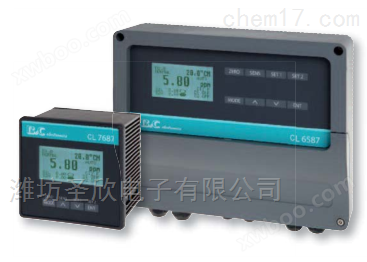

Ozone concentration detector in water
NegotiableUpdate on 01/23
- Model
- Nature of the Manufacturer
- Producers
- Product Category
- Place of Origin
Overview
The ozone concentration detector in water, Italy's Pirelli CL-7687, is a B amp; amp; amp; amp; A series of products developed by C Company with 40 years of experience in instrument manufacturing and application, in collaboration with B amp; amp; amp; amp; C company's related measuring electrodes and sensors are used in conjunction, suitable for measuring and controlling ozone in water during industrial, water treatment, scientific research and other processes.
Product Details
Ozone concentration detector in water, Italy PIMA CL-7687
Key Features:
1. Measurement range: 0-20.00ppm
2. Display: Multi line LCD displays measurement values and status information, indicating the user's progress status.
3. Buttons: The ATI ozone concentration detector function buttons allow users to conveniently and quickly enter zero point, slope, control, and other functions for configuration.
4. Operation mode: Switching between automatic, measurement, and simulation modes provides a very user-friendly feature selection for installation, debugging, and use.
5. Software filtering: Two level software filtering, users can set the filtering time to make the measurement display more stable and reflect the process changes more realistically.
Analog signal output: Two isolated 0/4-20mA outputs, editable, reversible, more flexible in application, meeting various process control transmission needs.
7. Control relay contacts: The ATI ozone concentration detector instrument is equipped with two configurable control relays, which can perform control modes (switch, pulse proportional, segmented pulse proportional), hysteresis, and delay configuration control
8. PID output: Users can simulate signals through
Output configuration, control relay pulse proportional or intermittent pulse proportional configuration to achieve PID control. Different control configurations can be made.
9. Alarm: The ATI ozone concentration detector has two high and low alarm relays inside the instrument. When the process status exceeds the alarm configuration conditions, an alarm will be triggered or triggered by other related equipment at a passive point.
10. Dry contact signal input: Two external dry contact signal inputs can be used to maintain or activate alarms.
11. Self cleaning function: The instrument is equipped with a built-in self-cleaning control relay, which can be used to control self-cleaning equipment.
12. Wide power module: The ATI ozone concentration detector instrument adopts a wide power module, which can use 85-264VAC, 50/60Hz AC power modules.
13. Easy installation: The panel protection level is IP65, suitable for disk mounting
Precautions for using the Italian Pi Magnetic CL-7687 water ozone concentration detector:
1. Before powering on, be sure to confirm that the wiring is correct, as incorrect wiring may cause damage to the instrument. 2. Power cannot be obtained from the bypass of high-power equipment, and the power line and signal line should be separated. 3. The standard cable for electrode sensors is 3 meters long. If necessary, users can extend the cable themselves, but it should not exceed 15 meters. The extension cable needs to be a silver plated three core low resistance cable with shielded wire. It is recommended to connect the extension cable with a high insulation junction box.
Function settings of the ozone concentration detector in water:
1. Menu structure
2. Main interface and main menu
The dissolved ozone value is the main display on the main interface, while the temperature and current values are secondary displays. Directly above is the current dissolved ozone measurement value, and 4.12mA is the current output value.
3. Dissolved ozone calibration
Due to the fact that the zero potential and electrode slope of the newly dissolved ozone electrode using the constant voltage method are basically the same, calibration is generally not required during use. As it gradually changes during use, aging occurs, which requires a certain period of "calibration" to ensure measurement accuracy. The menu is as follows: Press the up and down keys in the main menu to select dissolved ozone calibration, and press the ENTER key to enter the dissolved ozone calibration interface.
Zero point calibration of dissolved ozone concentration detector in water
Calibrate the zero point of the dissolved ozone electrode. Before calibration, gently dry the electrode and place it in ozone free water (such as distilled water, purified water, etc.). Press the ENTER key on the instrument panel to enter, then press the MENU menu selection key to pop up the cursor. Press the up and down keys to modify. The default value is 0 and usually does not need to be changed. After stabilization, press the ENTER key to save the data. Press the ESC key to return to the previous menu.
Dissolved ozone slope calibration
Calibrate the slope of the dissolved ozone electrode. Enter the menu for calibrating the slope of dissolved ozone. Before calibration, place the dissolved ozone electrode in a known concentration of dissolved ozone standard solution, press the ENTER key on the instrument to enter, and then press the MENU menu selection key to pop up the cursor. The default constant value is 0.20mg/L. Press the up and down keys to change it to the already concentrated value, such as 0.30mg/L. After the dissolved ozone value stabilizes, press the ENTER key to save the data. After the dissolved ozone value stabilizes (± 0.01mg/L), it indicates that it has been calibrated. Press the ESC key to return to the previous menu.
4. Compensation setting for ozone concentration detector in water
Press the up and down keys in the main menu to select parameter settings, and press the ENTER key to enter the parameter settings menu, as shown below. The left image is the page, and the right image is the second page. Press the up and down keys to select various settings, as shown in this section.
Press the ENTER key to enter the compensation settings menu. Press the MENU menu selection key to pop up the cursor and move the cursor. You can use the up and down keys to modify the temperature. The temperature is divided into manual or automatic modes. If automatic is selected, the manual value is invalid, and vice versa. When equipped with NTC thermistor, the automatic measurement is the true value. If there is no NTC thermistor, manual input can be selected.
Press ENTER to save data, press ESC to return to the previous menu.
5. Alarm settings
Select Alarm Settings in the Parameter Settings menu and press ENTER to enter the Alarm Settings menu. Press the MENU menu selection key to pop up the cursor, move the cursor, and use the up and down keys to make modifications.
High point H: high alarm setting, lag H: lag amount of high point. Low point L: Low alarm setting. Lag L: The amount of lag at the low point. Note: The lag is set within the range of 0 to (high point H value - low point L value).
To prevent the relay from continuously jumping or to control the width of dissolved ozone values, this instrument is equipped with this function. The specific operation is as follows: adjust the hysteresis by up and down. Adjust the hysteresis of the relay (customers can adjust it within this range according to their needs, and the initial value of the instrument is 0.5 when it leaves the factory). After adjusting it, press the ENTER key to store it, and press the ESC key to return to the previous menu.
High point relay: will set the HIGH value when the actual measured value is higher than the high alarm setting value
When the actual measured value drops below (high point H value - lag H value), release the action.
Low point relay: It will activate when the actual measured value is below the low alarm setting value LOW, and release when the actual measured value rises above (low point L value+hysteresis L value). Beneficial for extending the service life of relays or AC contactors. So users must set high, low, and hysteresis levels according to the actual situation.
485 communication
Select 485 communication in the parameter settings menu of the water ozone concentration detector, and press the ENTER key to enter the 485 communication menu. Press the MENU menu selection key to pop up the cursor, move the cursor, and you can press it
Press the button to make modifications. Communication address (hexadecimal), press ENTER to store data, press ESC to return to the previous menu. (Note: Please consult the manufacturer or distributor for specific protocol specifications)
7. Current output setting
The dissolved ozone values corresponding to the 4-20mA output at the factory are 0-20 mg/L, but users can set the corresponding values according to their own requirements to meet industrial control needs. Press the MENU menu selection key to pop up the cursor, move the cursor, press the up and down keys to make modifications, press the ENTER key to store data, and press the ESC key to return to the previous menu. Output current (mA): I=16 × (C-A)/(B-A)+4
Note: I is the output current value, 4mA ≤ I ≤ 20mA
C is the current measured dissolved ozone value of the instrument, 0.00 ≤ C ≤ 20mg/L
A is the number corresponding to 4mA in the setting, and B is the value corresponding to 20mA in the setting
8. Backlight time of ozone concentration detector in water
Select backlight time in the parameter settings menu and press ENTER to enter the backlight settings menu. Press the MENU menu selection key to pop up the cursor, move the cursor, and press the up and down keys to make modifications. Press ENTER to store data, press ESC to return to the previous level
Menu. Backlight control can make the instrument more energy-efficient, protect the display screen, and extend its lifespan.
9. Restore factory settings
Select 'Factory Reset' from the parameter settings menu and press ENTER to enter the 'Factory Reset' menu. Press the MENU menu selection key to pop up the cursor, which can be modified by pressing the up and down keys. Press ENTER to store data, press ESC to return to the previous menu.
7. Daily maintenance points for ozone concentration detector in water:
The instrument is usually calibrated before leaving the factory, and users can directly put it into use.
The online monitoring of the measured medium should maintain a certain flow rate and be constant, with a low flow rate of 15cm3/S.


