-
E-mail
sales@6li.com
-
Phone
13585888882
-
Address
2nd Floor, Building 29, No. 4671 Cao'an Road, Jiading District, Shanghai
Product Categories
Leli China Co., Ltd
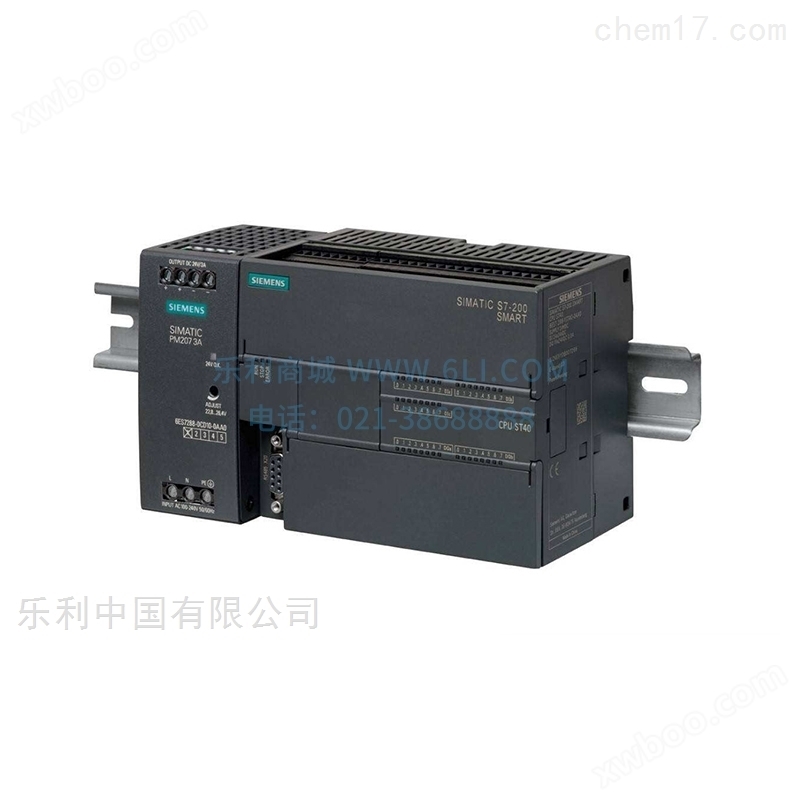
6ES7 312-1AE14-0AB0 Siemens S7-300 series PLC
NegotiableUpdate on 01/22
- Model
- Nature of the Manufacturer
- Producers
- Product Category
- Place of Origin
Overview
Shanghai Leli Automation Technology Co., Ltd. Leli Network * 6ES7 312-1AE14-0AB0 Siemens S7-300 series PLC
Product Details
| Product Category | model | brand | series | spot inventory | price |
| PLC | 6ES7 312-1AE14-0AB0 | Siemens | S7-300 series | 150 | 2277 |
| PLC | 6ES7 314-1AG14-0AB0 | Siemens | S7-300 series | 150 | 3818 |
| PLC | 6ES7 315-2AH14-0AB0 | Siemens | S7-300 series | 150 | 9142 |
| PLC | 6ES7 315-2EH14-0AB0 | Siemens | S7-300 series | 150 | 12880 |
| PLC | 6ES7 317-2AK14-0AB0 | Siemens | S7-300 series | 150 | 21275 |
| PLC | 6ES7 317-2EK14-0AB0 | Siemens | S7-300 series | 150 | 22770 |
| PLC | 6ES7 318-3EL01-0AB0 | Siemens | S7-300 series | 150 | 27945 |
| PLC | 6ES7 901-0BF00-0AA0 | Siemens | S7-300 series | 150 | 345 |
| PLC | 6ES7 972-0BA12-0XA0 | Siemens | S7-300 series | 150 | 241 |
| PLC | 6ES7 972-0BB12-0XA0 | Siemens | S7-300 series | 150 | 322 |
| PLC | 6ES7 972-0BA52-0XA0 | Siemens | S7-300 series | 150 | 241 |
| PLC | 6ES7 972-0BA52-0XB0 | Siemens | S7-300 series | 150 | 241 |
| PLC | 6ES7 972-0BB52-0XA0 | Siemens | S7-300 series | 150 | 322 |
| PLC | 6ES7 972-0BB52-0XB0 | Siemens | S7-300 series | 150 | 322 |
| PLC | 6GK1 500-0EA02 | Siemens | S7-300 series | 150 | 517 |
| PLC | 6GK5 204-2BB10-2AA3 | Siemens | S7-300 series | 150 | 6440 |
| PLC | 6GK1 901-1BB30-0AA0 | Siemens | S7-300 series | 150 | 145 |
| PLC | 6GK1 901-1BB10-2AA0 | Siemens | S7-300 series | 150 | 115 |
| PLC | 6GK1 901-1BB10-2AB0 | Siemens | S7-300 series | 150 | 1150 |
| PLC | 6GK1 901-1BB10-2AE0 | Siemens | S7-300 series | 150 | 5750 |
| PLC | 6ES7 315-6FF04-0AB0 | Siemens | S7-300 series | 150 | 15870 |
| PLC | 6ES7 315-2FJ14- 0AB0 |
Siemens | S7-300 series | 150 | 17825 |
| PLC | 6ES7 317-6FF04- 0AB0 |
Siemens | S7-300 series | 150 | 24150 |
| PLC | 6ES7 317-2FK14- 0AB0 |
Siemens | S7-300 series | 150 | 27945 |
| PLC | 6ES7 318-3FL01- 0AB0 |
Siemens | S7-300 series | 150 | 34270 |
| PLC | 6ES7 912-0AA00-0AA0 | Siemens | S7-300 series | 150 | 57 |
| PLC | 6GK1 571-0BA00-0AA0 | Siemens | S7-300 series | 150 | 2702 |
| PLC | 6XV1 840-2AH10 | Siemens | S7-300 series | 150 | 13 |
| PLC | 6ES7 953-8LF20-0AA0 | Siemens | S7-300 series | 150 | 282 |
| PLC | 6ES7 953-8LG20-0AA0 | Siemens | S7-300 series | 150 | 517 |
| PLC | 6ES7 953-8LJ30-0AA0 | Siemens | S7-300 series | 150 | 1207 |
| PLC | 6ES7 953-8LL31-0AA0 | Siemens | S7-300 series | 150 | 1725 |
| PLC | 6ES7 953-8LM20-0AA0 | Siemens | S7-300 series | 150 | 2012 |
| PLC | 6ES7 953-8LP20-0AA0 | Siemens | S7-300 series | 150 | 2530 |
| PLC | 6ES7 312-5BF04-0AB0 | Siemens | S7-300 series | 150 | 2852 |
| PLC | 6ES7 313-5BG04-0AB0 | Siemens | S7-300 series | 150 | 5865 |
| PLC | 6ES7 313-6CG04-0AB0 | Siemens | S7-300 series | 150 | 7072 |
| PLC | 6ES7 314-6CH04-0AB0 | Siemens | S7-300 series | 150 | 10120 |
| PLC | 6ES7 314-6EH04-0AB0 | Siemens | S7-300 series | 150 | 11097 |
| PLC | 6XV1 830-0EH10 | Siemens | S7-300 series | 150 | 13 |
| PLC | 6ES7 972-0AA02-0XA0 | Siemens | S7-300 series | 150 | 2047 |
| PLC | 6ES7 392-1AM00-0AA0 | Siemens | S7-300 series | 150 | 207 |
| PLC | 6ES7 392-1AM00-1AB0 | Siemens | S7-300 series | 150 | 207 |
| PLC | 6ES7 392-1BM01-0AA0 | Siemens | S7-300 series | 150 | 241 |
| PLC | 6ES7 392-1BM01-1AB0 | Siemens | S7-300 series | 150 | 241 |
| PLC | 6ES7 350-1AH03-0AE0 | Siemens | S7-300 series | 150 | 2070 |
| PLC | 6ES7 331-7KF02-0AB0 | Siemens | S7-300 series | 150 | 2990 |
| PLC | 6ES7 332-5HD01-0AB0 | Siemens | S7-300 series | 150 | 1782 |
| PLC | 6ES7 321-1BL00-0AA0 | Siemens | S7-300 series | 150 | 1552 |
| PLC | 6ES7 341-1CH02-0AE0 | Siemens | S7-300 series | 150 | 4715 |
| PLC | 6ES7 336-4GE00-0AB0 | Siemens | S7-300 series | 150 | 6095 |
| PLC | 6ES7 326-1BK02-0AB0 | Siemens | S7-300 series | 150 | 6325 |
| PLC | 6ES7 307-1EA01-0AA0 | Siemens | S7-300 series | 150 | 918 |
| PLC | 6ES7 326-2BF01-0AB0 | Siemens | S7-300 series | 150 | 6382 |
S7-300 signal module
I/O module range of S7-300
Overview
description
advantage
Design and functionality
Technical data
description
The signal module is the interface for process operations of SIMATIC S7-300. The versatility of the S7-300 module range allows for modular customization to meet diverse tasks.
S7-300 supports multi-faceted technical tasks and provides detailed communication options. In addition to the CPU with integrated functions and interfaces, there are various special modules for technology and communication in the S7-300 design.
advantage
Easy installation
Connect sensors/actuators through front-end connectors. The following connection methods can be used for connection:
Screw type terminal block
Spring type terminal block
Quick connection (insulation puncture)
After replacing the module, simply insert the connector into a new module of the same type and keep the original wiring. The encoding of front-end connectors can avoid errors.
Quick Connect
Connecting SIMATIC TOP is simpler and faster than onboard I/O on compact CPUs. Pre assembled front-end connectors with a single cable core can be used, as well as a complete plug-in modular system with front-end connector modules, connecting cables, and terminal boxes.
High assembly density
The numerous channels in the module enable the S7-300 to achieve a space saving design. Modules with 8 to 64 channels (digital) or 2 to 8 channels (analog) in each module can be used.
Simple parameterization
Use STEP 7 to configure and parameterize these modules without the need for inconvenient conversion settings. The data is stored centrally, and if a module is replaced, the data will be automatically transferred to the new module to avoid any setting errors. When using a new module, there is no need for software upgrade. Configuration information can be copied as needed, such as for standard machines. Return to top of page
Design and functionality
Many different digital and analog modules provide accurate input/output based on the requirements of each task.
There are differences between digital and analog modules in terms of channel quantity, voltage and current range, electrical isolation, diagnosis, and alarm functions. Among all the module ranges mentioned here, SIPLUS components can be used for extended temperature ranges of -25... 60 ° C and harmful air/condensation.
Diagnosis and interruption
Many modules also monitor signal acquisition (diagnosis) and signals transmitted back from processes (process interrupts). This allows for immediate response to errors that occur during the process (such as wire breaks or short circuits) and any process events (such as rising or falling edges during digital input). By using STEP 7, it is easy to program the response of the controller.
module
When used for testing and simulation, the analog module can be inserted into S7-300. This module simulates the encoder signal by converting and indicating the output signal through LED.
This module can be inserted anywhere (without following slot rules). This virtual module reserves a slot for an unconfigured signal module. When installing the module later, the mechanical configuration and address allocation of the entire configuration will not be changed.
The flexible SIMOTION operating system provides multiple programming languages and a large number of freely programmable optionsPLCFunction. Due to its rich process functions, you can freely implement almost any type of machine. . The SIMOTION operating system software achieves high flexibility in machine manufacturing, combining a powerful operating system with high performancePLCCombining functions, various motion control functions, and process functions together. . SIMOTION operating system software: High flexibility customized services are achieved through loadable process functions. The SIMOTION operating system includesPLCFunctions, task systems, and all SIMOTION process functions integrated through process packages.
Design and functionality
Many different digital and analog modules provide accurate input/output based on the requirements of each task.
There are differences between digital and analog modules in terms of channel quantity, voltage and current range, electrical isolation, diagnosis, and alarm functions. Among all the module ranges mentioned here, SIPLUS components can be used for extended temperature ranges of -25... 60 ° C and harmful air/condensation.
Diagnosis and interruption
Many modules also monitor signal acquisition (diagnosis) and signals transmitted back from processes (process interrupts). This allows for immediate response to errors that occur during the process (such as wire breaks or short circuits) and any process events (such as rising or falling edges during digital input). By using STEP 7, it is easy to program the response of the controller.
module
When used for testing and simulation, the analog module can be inserted into S7-300. This module simulates the encoder signal by converting and indicating the output signal through LED.
This module can be inserted anywhere (without following slot rules). This virtual module reserves a slot for an unconfigured signal module. When installing the module later, the mechanical configuration and address allocation of the entire configuration will not be changed.
The flexible SIMOTION operating system provides multiple programming languages and a large number of freely programmable optionsPLCFunction. Due to its rich process functions, you can freely implement almost any type of machine. . The SIMOTION operating system software achieves high flexibility in machine manufacturing, combining a powerful operating system with high performancePLCCombining functions, various motion control functions, and process functions together. . SIMOTION operating system software: High flexibility customized services are achieved through loadable process functions. The SIMOTION operating system includesPLCFunctions, task systems, and all SIMOTION process functions integrated through process packages.
Similar Product Recommend